Support on demand, any hour.
Ask the assistant from any page for an answer right away. Want a person? A specialist follows up.

Ask tonight. Get the answer tonight.
Ask in your own words
No form and no menu to dig through. Type the question the way you would ask a colleague.
An answer right away
The assistant replies from the published help center, at any hour, and shows which article the answer came from.
A person when you want one
Choose Ask a person and leave your email. A specialist replies, and you get a reference on the spot.

In your Workspace
Signed in, help can check the shoot itself.
Check a shoot
Pick a shoot and the assistant reads its real status, tells you what happened in plain sentences, and runs any fix that is yours to run, like re-running photos our quality check flagged.
When it needs a person, a specialist sees what the check found and replies in the same chat.
One thread per question
Every conversation keeps a reference, a status you can read at a glance and its full history, in the chat and in Help.
- Open
Your message starts the conversation and gets its reference.
- With a specialist
A specialist has it, and the assistant steps back.
- Awaiting your reply
The specialist answered, here and by email. Reply in the same thread.
- Resolved
Done, with the whole conversation kept in Help.
When something goes wrong, the fix is written down.
A wrong edit is redone free.
If an edit came out wrong or an order failed, we re-edit or reprocess it at no charge. That is always the first remedy.
Photos that could not be edited get their credits back.
The credits go back to your balance, and Check a shoot tells you once they have.
Money questions go to a person.
Refunds, credits, cancellations and account changes are always handled by a person. The assistant hands them over as soon as you ask.
Remedies are credits, and the policy says so.
We do not issue cash refunds on completed digital work. What we do instead is published, in plain terms.
Read the refund policy
Questions we hear most
- When can I get help?
- Any time. The assistant answers at any hour, on every page of the site and inside your Workspace. When you want a person, a specialist follows up: in the same chat if you are signed in, or by email with a reference if you are not.
- Is the assistant a person?
- No. It is an automated assistant, and it says so before your first chat. It answers from our published help center, and you can ask for a person at any point.
- An edit came out wrong. Can it be redone?
- Yes. If an edit came out wrong or an order failed, we re-edit or reprocess it at no charge. Signed in, open Help, choose Check a shoot and re-run the photos our quality check flagged, or tell us which order.
- My order looks stuck. What should I do?
- Sign in, open Help and choose Check a shoot. The assistant reads the shoot’s real status, tells you what happened and runs any fix that is yours to run. If it is genuinely stuck or missing a group of photos, a specialist reprocesses it at no charge.
- Some photos are missing from my delivery.
- Open Help, choose Check a shoot and pick the shoot to see what happened to each photo in it. Photos that could not be edited have their credits returned, and a genuinely missing group can be reprocessed at no charge.
- Do you offer refunds?
- Remedies are platform credits, not cash. A wrong edit or a failed order is reprocessed at no charge first. If reprocessing still cannot produce a usable image, the credits charged for it can be returned under our refund and reprocessing policy. Refunds, credits, cancellations and account changes are always handled by a person.
- How do I get my finished photos again?
- Delivered media lives in a branded gallery and delivery portal with single, bulk ZIP and MLS-ready downloads. If you need it again, we can resend a delivery or make a new download link.
- Is AI editing allowed for MLS listings?
- Rules vary by board, and most treat AI enhancement like any other photo editing. Edits that change material facts, mainly virtual staging and virtual twilight, should be disclosed in the listing, so check your MLS guidelines. Our AI disclosure policy explains how Better Listing Media handles it.
The answer may already be written down
Phone app
Help with the phone app
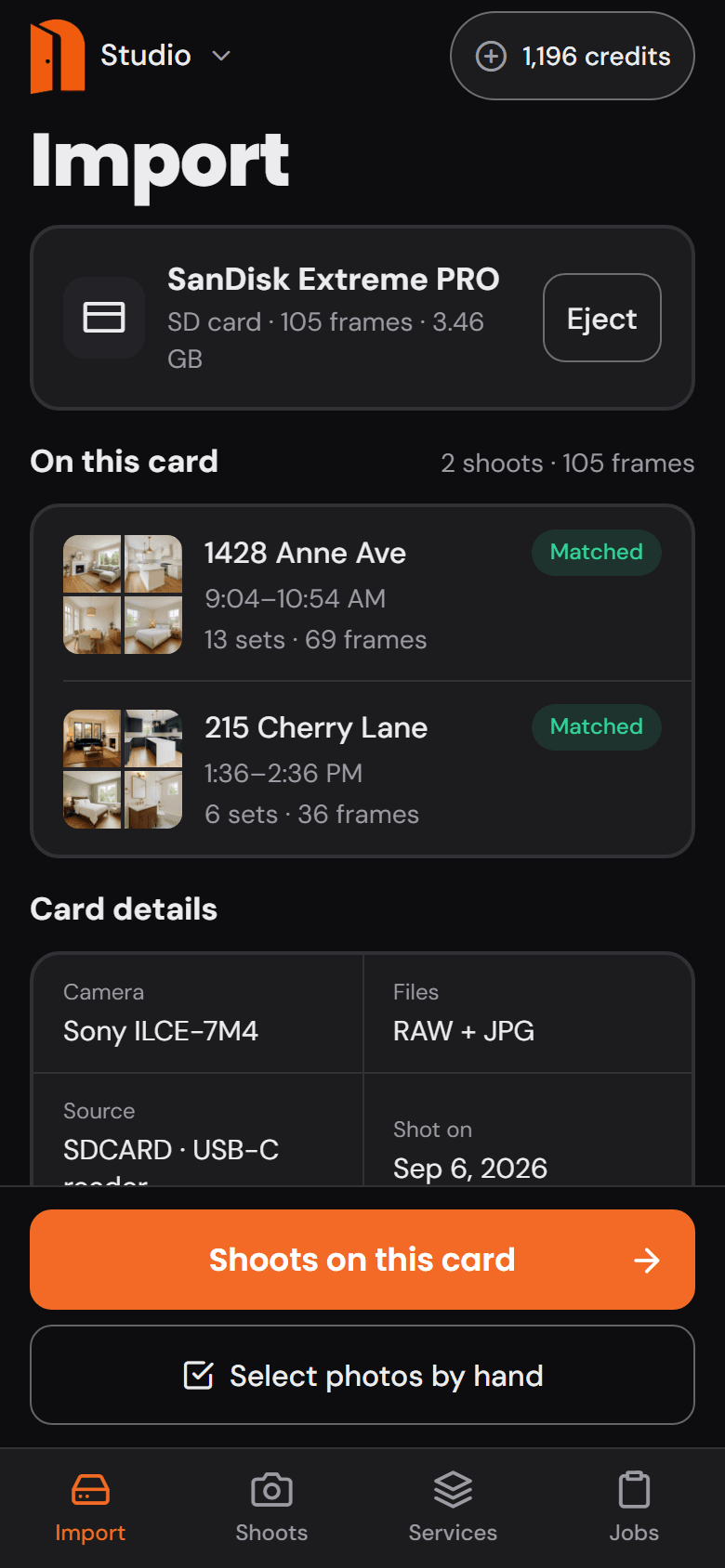
Better Listing Media for iPhone and Android: import from the card, order edits, approve, deliver, and run the day’s bookings and clients.
How do I sign in on my phone?
With the same account you use on the web: your email and password, or the Apple or Google button if that is how you signed up. You can also create an account in the app. The app works with the Starter, Professional, Business and Enterprise plans.
How do I import from a card reader?
On iPhone, plug in a USB-C or Lightning card reader, open Import and tap Choose the card: the card appears in Files under Locations, so pick it or its DCIM folder. On Android, connect a USB card reader and choose the card in the folder picker. Photos are read where they sit, and nothing uploads until you send a shoot. An iPhone asks for the card again each time the app starts.
Can I buy a plan or credits in the app?
Not in this version. Your plan and credits belong to your account and are managed on the web. The app uses the same balance, and every Service shows its price before you add it.
How do I delete my account?
In the app, open Account and tap Delete account at the bottom. On the web it is Account, then Preferences, then Delete account, and you can also ask without signing in. We email a link to confirm, and after you confirm you have 30 days to change your mind by signing back in.


Still stuck? Make it our problem.
Ask the assistant at any hour, or write to us and a person reads it.
support@betterlistingmedia.com