Clients and listings
Every client,one timeline.
Who shot what, when, and for how much: each client's shoots, orders, and invoices in one place, with the context to win the next booking.
One record, three apps
The relationship, followed through.
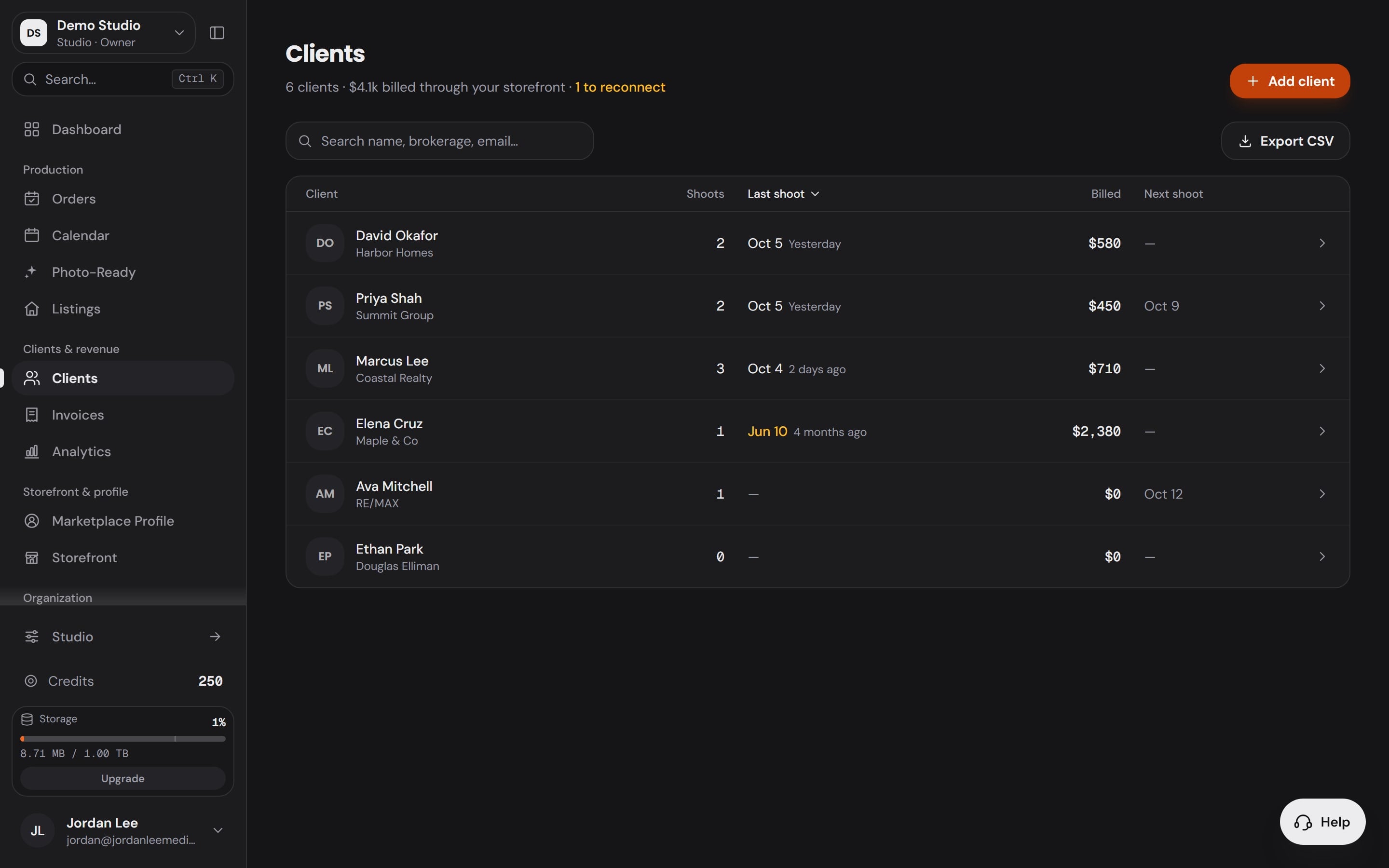
Every client, with the whole relationship on the row.
Shoots, last shoot, billed and next shoot sit on every client, sorted any way you like. Search by name, brokerage or email, and export the book to CSV whenever you need it somewhere else.
The quiet ones, flagged after 90 days.
A client with history, nothing upcoming and no shoot in 90 days turns amber. One filter shows only them, so a slow month becomes a call list instead of a lost account.
Invoices beside the work.
Every payment a client makes through your connected processor arrives as a paid invoice, filed against the shoot it paid for: paid and refunded at a glance, net after fees, one click to CSV.
Every figure opens the records behind it.
Analytics reads your own payments, orders and deliveries: paying clients, new clients, returning clients and your top client's share, with the rows behind each number one click away.
- Clients
- Reconnect
- Invoices
- Analytics
One record, three apps
The relationship,followed through.
- Workspace1
Clients
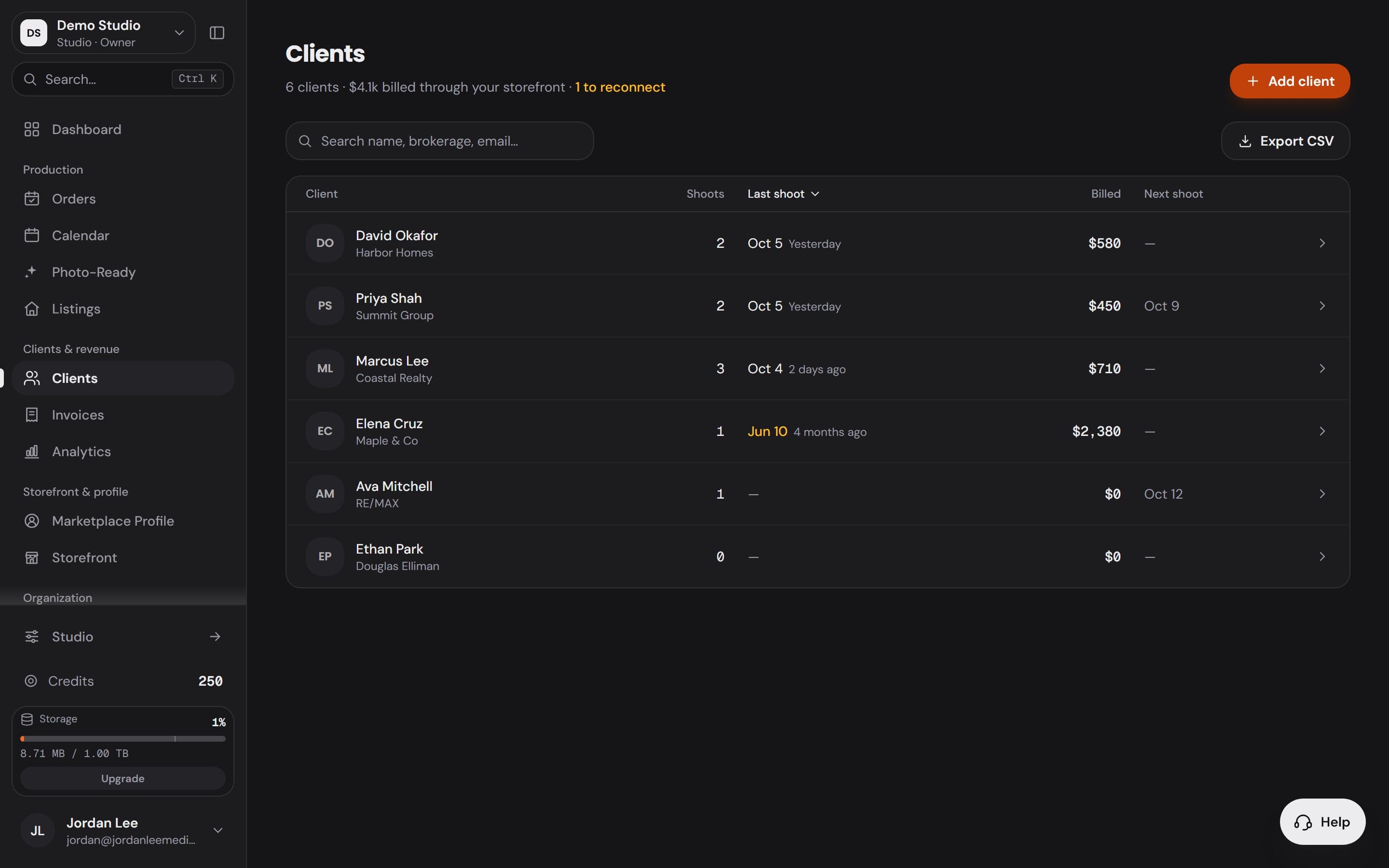
Every client, with the whole relationship on the row.
Shoots, last shoot, billed and next shoot sit on every client, sorted any way you like. Search by name, brokerage or email, and export the book to CSV whenever you need it somewhere else.
- Workspace2
Reconnect
The quiet ones, flagged after 90 days.
A client with history, nothing upcoming and no shoot in 90 days turns amber. One filter shows only them, so a slow month becomes a call list instead of a lost account.
- Workspace3
Invoices
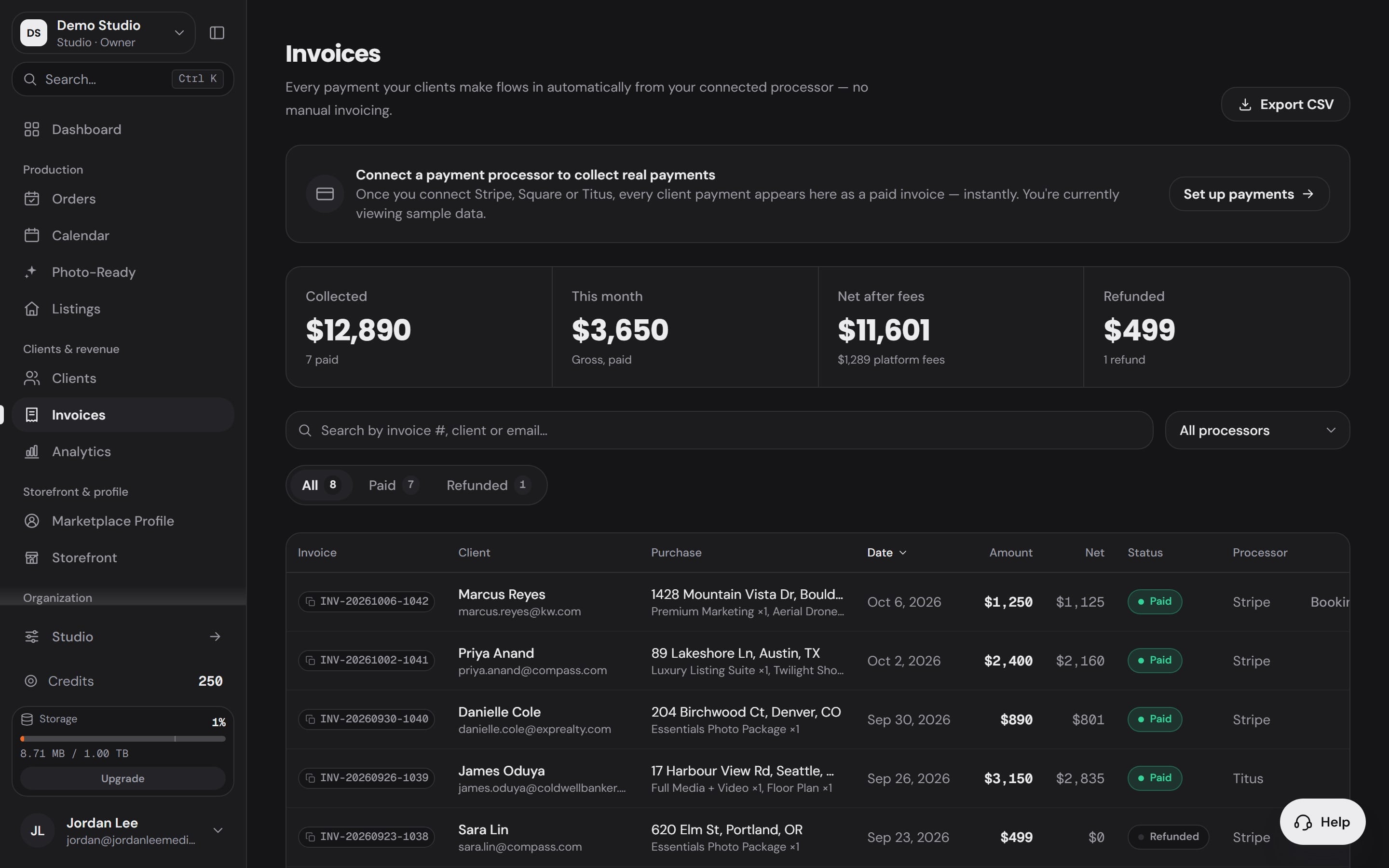
Invoices beside the work.
Every payment a client makes through your connected processor arrives as a paid invoice, filed against the shoot it paid for: paid and refunded at a glance, net after fees, one click to CSV.
- Workspace4
Analytics
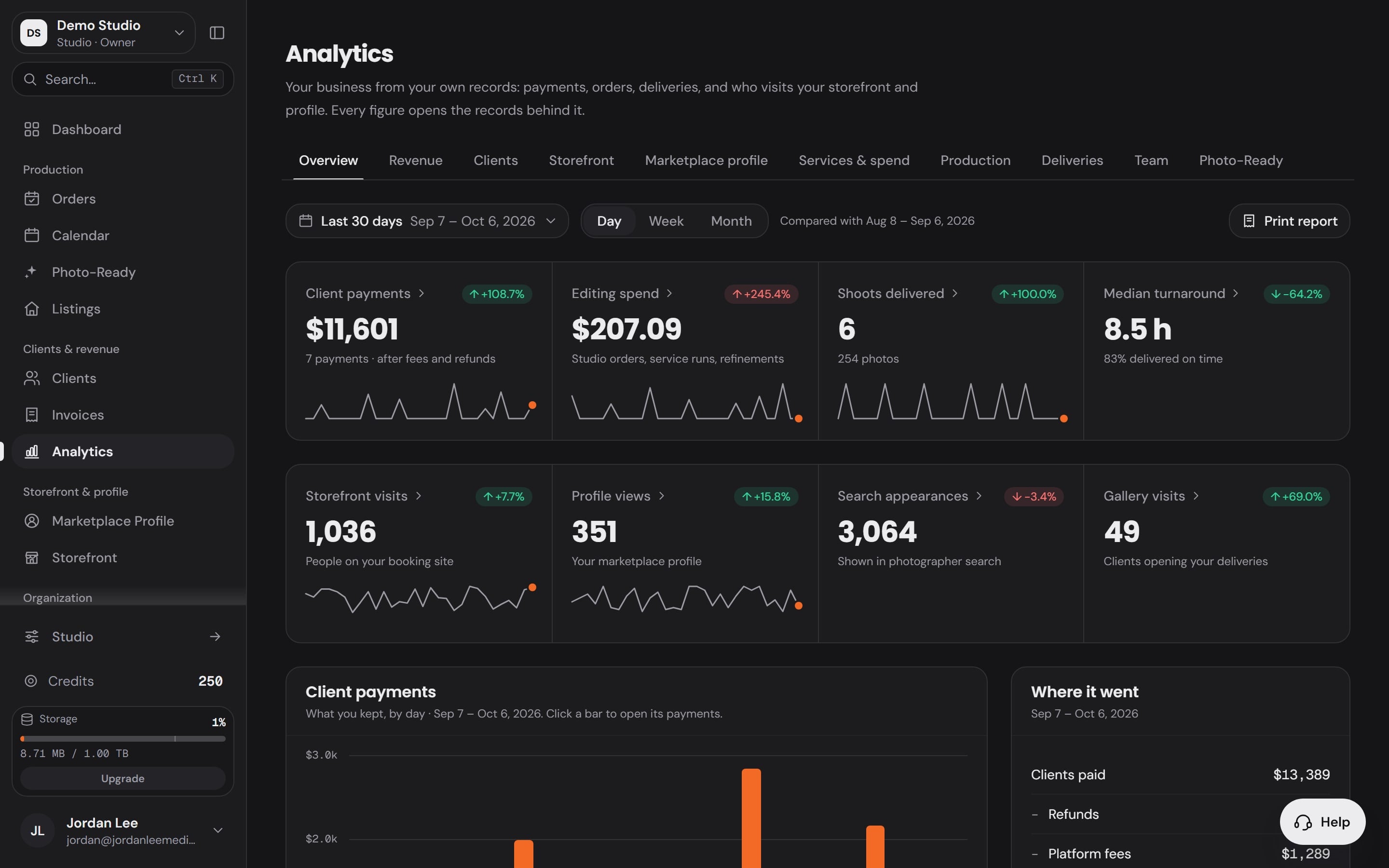
Every figure opens the records behind it.
Analytics reads your own payments, orders and deliveries: paying clients, new clients, returning clients and your top client's share, with the rows behind each number one click away.
Every listing on file,by address.
Listings keeps every property you have shot beside the clients who ordered them: pending shoots and delivered photos, searchable by address, so a second shoot at the same house starts with the first one already open.
Made by the booking
A listing is the property. Book a shoot at an address and it appears, with every shoot and delivery at that address under it.
Pending or live
Its state, photo count and cover are read from the orders and deliveries themselves, never typed.
Filtered by client
Show one agent's whole street, or search any address you have ever shot.
The record builds itself.You work it.
The record builds itself
Add clients directly or bring your list over. From there, bookings, deliveries, and invoices accumulate on the timeline as they happen.
Context before you quote
Open the record before replying: what they booked before, what they paid, how long since the last shoot. Price and pitch accordingly.
Rebook the quiet ones
Work the reconnect filter like a call list. The cheapest booking you'll ever win is a past client you didn't forget.
Built intoevery workspace.
Repeat business is where a media business makes its margin, so the CRM works that angle hard: shoot counts, last-shoot dates, and lifetime value sit on every row, and a reconnect filter surfaces the clients who've gone quiet. Invoices live in the same workspace, so who owes what is never a second system.
The full relationship
Every shoot, order, and invoice on a single client record. No cross-referencing an inbox, a spreadsheet, and a payment app to answer one question.
Repeat-client context
Shoot count, last shoot, and lifetime value on every row. Sort by any of them and you're looking at your best clients in one click.
A reconnect list
Clients who haven't booked in a while get flagged. Filter to the lapsed list and turn quiet relationships back into scheduled shoots.
Invoices beside the work
Invoice status lives in the same workspace as the shoots they bill for: paid and refunded at a glance, exportable to CSV.
Invite clients in
Send a client an invite from their record. Linked clients book and receive deliveries through your branded surfaces with an account of their own.
Your data stays yours
One-click CSV export for clients and invoices. Your book of business is portable, not held hostage.
Asked beforeswitching.
Do I have to enter every client by hand?
No. Add clients one at a time or bring your existing list over, and from then on the workspace keeps records current as bookings, deliveries, and invoices happen. CSV export works in the other direction whenever you need the data out.
What counts as a lapsed client?
A client who hasn't booked in long enough that the relationship is at risk. The reconnect filter surfaces them so a quiet quarter turns into an outreach list instead of a lost account.
Can my clients see the CRM?
No. The CRM is your operating view. Clients only ever see your branded surfaces: the storefront, the booking form, and the delivery portal.
Are invoices part of the same system?
Yes. Invoices live in the same workspace as clients and shoots, with status at a glance and CSV export, so the money side of a relationship sits right next to the work.
The rest of the workspace

Run the whole businessfrom one place.
Bookings, storefront, delivery, clients, and team: one login, one client record, one brand. Start on the free plan and have your storefront live today.
Free plan · publish your storefrontNo credit card required